
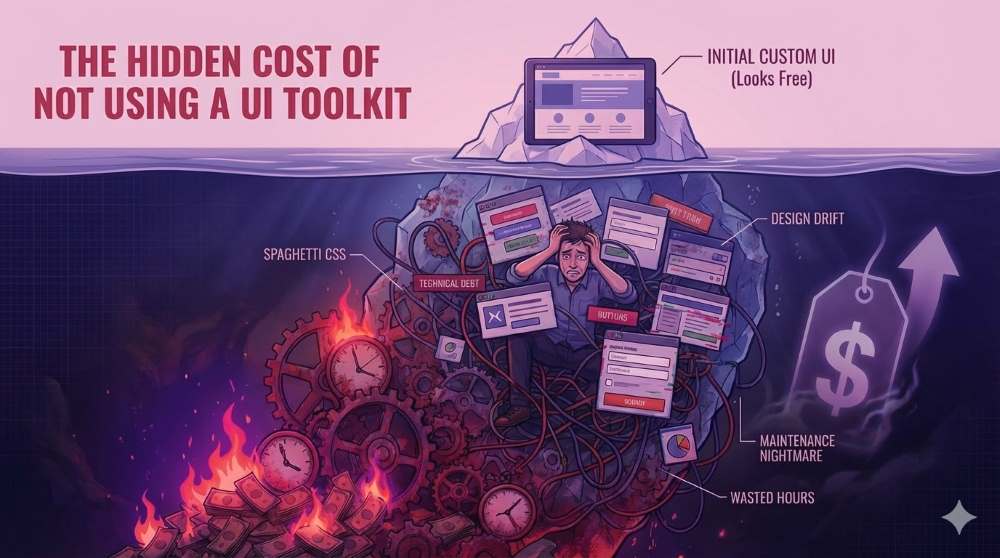
Building user interfaces from scratch can make you feel liberated. Why? You have complete control over everything you use to make the custom UI spectacular.
As you strain to meet the deadline on a tight budget, other hidden issues start to surface. You need more time to complete the UI, more technical capabilities are in demand, and there is onboarding friction when newbies are involved.
With time, the coding velocity and morale die down. Can UI toolkits save you from the hidden costs? Yes. To appreciate their value, here is the real cost of not using a UI kit in your projects.
The Costly Builder’s Fallacy
If you are building a UI from scratch, you get the feeling that it's free. Well, it's your effort, and you didn’t have to spend on a ready-made UI kit like TimelyUI or a library that will make your work easier.
So, it’s just you with your favorite IDE, some HTML, CSS, and JavaScript. You know that you can use the set of languages (and frameworks) to come up with wonderful components, so why not?
We call that – the builder’s fallacy.
When you consider the free part, it means you are not paying anything upfront. On the other hand, web apps (and, actually, software in general) reveal their actual cost much later. You realize it when it's time for maintenance, onboarding, refactoring, and when you have to deal with a tired body and mind.
You see, building a UI from scratch is okay, but it's also like taking a loan with a very high interest rate. In the initial months (or during the grace period), you have full control over the funds and how you would like to use them. As the interest accumulates, that’s when you start feeling the debt heat.
In app development, the interest you pay later after making a custom UI compounds:
- The developer hours
- Missed deadlines due to the magnitude
- Time taken to incorporate changes
- The mounting frustrations after receiving some ‘not so nice’ feedback
As time goes by, you realize that the pressure you are dealing with does not stem from progress in week one after deployment. It's from a six-month-old sore that requires minor UI changes, and from friction between new and old team members as the prior team tries to keep up. Is that all? No! Your product appears to have some inconsistencies, no matter the fixes you apply.
That’s when you realize it’s easier to adopt a toolkit than build a custom UI for your project. Customizing the components saves time.
The Tax of Time Taken
Every developer we know has said something like this in their coding life: “Hey! Do it fast…it’s just a simple button.”
In the current internet affairs, a button is not just a button, and a search bar is not just a search bar. What’s more?
Let's use a button as our example.
For a button to work in a deployed application, there is more than the proper padding and color gradients. You need grounding styles that work well across all browsers, including the idle, hover, and active states.
Is the button supposed to help users fetch, store, or load and display some data? Well, you also need the loading and disabled states. These days, apps and websites support dark mode; if you are considering it, you need a dark mode variant.
Should we keep going? Okay…
The physically challenged folks and their supporting organizations are suing site and app owners heavily due to accessibility issues. So, you should care about ARIA attributes and keyboard navigation, among other necessities, to avoid penalties and court days. Have we mentioned responsiveness yet? No.
Now, that's the effort of coding just one button. Multiply that by every component and page you are supposed to design, and see where we are going with this conversation. Your simple programming tasks don’t feel like sprinting anymore.
With more time taken, now comes the cost slap:
The developer you hired for $80 per hour now charges about $240 for the 3 hours spent working on the button and maybe the search bar. If you compare that to purchasing the TimelyUI Pro kit, someone is losing a big chunk of their funding.
It costs way less to adopt a UI kit or design system since the components are pre-made and tested. That reduces the user interface work to a few days of development time.
Furthermore, the cost of hiring a developer does not occur once. It happens every time you need an upgrade, fix upcoming bugs, or even an entirely new project. Using UI kits alleviates part of the costs involved.
It’s Hectic to Customize Stylesheets
Customizing a user interface may not render messy CSS classes at the moment. Eventually, it will. Why?
When you don’t have a guiding north star for your project, stylesheets slowly turn into write-only code. Developers always fear that phrase because it signifies a ‘don’t touch’ file; in this case, it’s your custom styles.css.
When writing CSS, it’s common to reach a point where you are not sure why you used a particular class. Later, when revisions come by, you cannot delete anything until you are double sure nothing will break, especially in pages you have not visited for months.
So, instead of fixing the code, most developers scroll down, add comments and new classes at the bottom, and then hope for the best. As time goes by, the stylesheet grows longer, with new custom CSS files added.
Eventually, you have to deal with specificity wars while small UI changes introduce unwanted regressions. Now, the codebase is quite delicate, and everyone is literally beating around the bush to fix the UI.
UI toolkits solve all this by giving you a single direction to follow, since the builders have already enforced a structure. In our TALL stack setup, for example, the styles in TimelyUI are already in the built blade components. So, if you decide to get rid of an element, the styles involved also go away, leaving no residue that requires some expertise cleanup.
When you finish the task, you don’t have idling CSS classes in your base code. UI kits help with such global messes, providing isolated components with their specified behavior that don't break down over time.
Dealing with Effects of Design Drift
Design drift happens slowly, without anyone realizing, until it reaches a dangerous point. At the beginning, your UI looks perfect, and everything is in line. As you progress, issues start protruding.
Let’s go back to our buttons example, from the previous point, to bring this point home.
Let’s say you are a team of three developers. Developer A adds a nice green button. Developer B adds another button with the exact dimensions but with a darker shade of green. Developer C adds a border radius to make them look nice and make the border visible when users hover with a different shade of green. It seems a green theme inspires three folks.
Now, let’s keep doing that to everything else from the navigation bar at the top to the social media icons placed in the footer. By the time you are done, your app looks like the results of Frankenstein experiments. Everything is just ‘stitched together’.
For developers, it's progress with no harm. To users, that's a turnoff that increases bounce rates and other effects of poor UI/UX design.
Those using your product will judge everything by looks first before they get to functionality. So, if your components are uneven and there is no uniformity, users assume something is not right with your site or app. You can have your whole backend perfect, but they will still question everything.
You can evade the effects of design drift by making a UI toolkit your single source of truth. That way, nobody has to redefine the typography, spacing, or other UI design elements. Your team also doesn’t have to remember what goes into the UI to make it look better – the specifics are already enforced.
So, instead of humans having to maintain UI consistency, the UI kit or system binds it to pre-built components.
Onboarding Costs and the Bus Factor
All custom UIs you know have a tight connection with the people who built them. In other words, the ones working on it always explain it better.
Let’s revisit our three developers.
Developer A came up with a nice dropdown for the navigation. It works well because it relies on custom CSS and JavaScript to behave in a way that will take people some time to get accustomed to.
The dropdown has about a hundred lines of code that the developer understands perfectly. The problem is that he is the only one who understands it. To the rest of the team, that’s the write-only part.
One fine day, Developer A leaves. The dropdown is still there, though.
Now, whatever they worked on is legacy code that developers B and C don’t want to reconsider. Bugs arise, the team works on them, but the fixing makes it worse.
As time passes, the owner needs to add new features, and you have to do so on fragile code. If you need a new frontend guy, you have to deal with a learning curve. By the time you are done, the whole UI is slowly calcifying.
That is how bus factor works.
Toolkits have saved many developers on rainy days when they have large ongoing projects to complete. The components in them exhibit predictable behavior, with well-defined APIs and proper documentation.
When a newbie steps in to replace developer A, it will not take two weeks to train them on what the UI is all about. The documentation, installation guides, and any other information required to keep him onboard are already there. In addition, all the components are immediately familiar to the eye, making learning and initial updates easier.
The Opportunity Cost in Development
If you learned about opportunity cost in your business classes, well, it’s applying here too.
Building a custom UI requires you to spend hours:
- Centering that div
- Ensuring the z-index is okay
- Dealing with spaces until you solve the given problem.
All that time spent means valuable time is lost to functionality, brand alignment, and other aspects that make your final product different.
When users interact with your product, they will admire perfect layouts, but they don't actually need them. What they pay for are the features and what they can do. So much effort and time could have been used to develop a superb dashboard and billing systems.
Competent developers acquire toolkits because they recognize the value beyond having a pretty interface. They want more time spent on the data flow, logic, and the overall behavior. That makes UI design a trivial matter.
UI toolkits already have the resources you need to build your UI, and nothing is stopping you from customizing them. So, you don’t need to make most of the decisions, and that’s how you end up buying back the valuable developer time.
If you are developing products in a competitive market, UI kits will help you save time and reduce the technical debt you incur.
Final Thoughts: UI Toolkits Save the Hidden Costs
By reaching this far, we are sure that you can answer this question: Is building a custom UI free? Working on your user interface is 'free' if you don't mind the time it takes, the dynamics involved, and the consistency of demand.
Having a customized user interface for every project you have is more expensive than adopting a UI toolkit. The prior brings in technical debt, onboarding friction, burnout, and all the other points we discussed above.
When developing web-based platforms, start with TimelyUI to help you stop paying the interest on accumulated UI debt.
Frequently Asked Questions
1. Is using a UI toolkit worth it?
Yes. Using a UI toolkit is worth it, especially if you are building complex platforms with many pages and complex data. It shortens development time; you can always reuse components, and there is consistency throughout.
2. Do I need a UI kit if I’m designing a simple interface?
Yes, you still need a UI kit to ease the overall development time. You have to consider that a simple interface will require more design work and customization over time. Having custom CSS is okay during the initial stages, but there will be more bloat later when it's time to customize and add new features.
3. If I'm building my custom projects, can't I create my internal toolkit for them?
It's possible to build your own internal toolkit, but over time, you'll face the maintenance burden. A UI kit is more of a ‘living thing’ than a ‘build once’ asset. Browsers and standards are constantly evolving. Keeping up with such shifts will prompt you to keep maintaining the kit, distracting you from your main objectives.